Cryo-ET / Tomography
RECOVAR supports tilt-series data for cryo-ET heterogeneity analysis, including the use of a focus mask.
Experimental
Cryo-ET support is newer than SPA support and may be less stable. No paper has been published on this feature yet.
RELION-5 input only
RECOVAR's cryo-ET support currently reads RELION-5 tilt-series data. Process your tomograms through the RELION-5 tomography pipeline (import → tilt-series alignment → particle extraction / Bayesian polishing) to produce the tomograms.star and particles.star that RECOVAR consumes. See the RELION-5 tomography tutorial for how to generate those files.
Using the GUI
In the Web GUI cryo-ET is a single checkbox. In the Pipeline form, point Particles at a RELION5 2D-tilt star (produced by recovar parse_relion5_tomo, see below), expand Advanced, and tick Tilt series. A cryo-ET panel appears -- per-tilt dose, tilt angles, and the CTF model are read automatically from the star, so the only common knob is Max tilts (how many tilts per series to use).
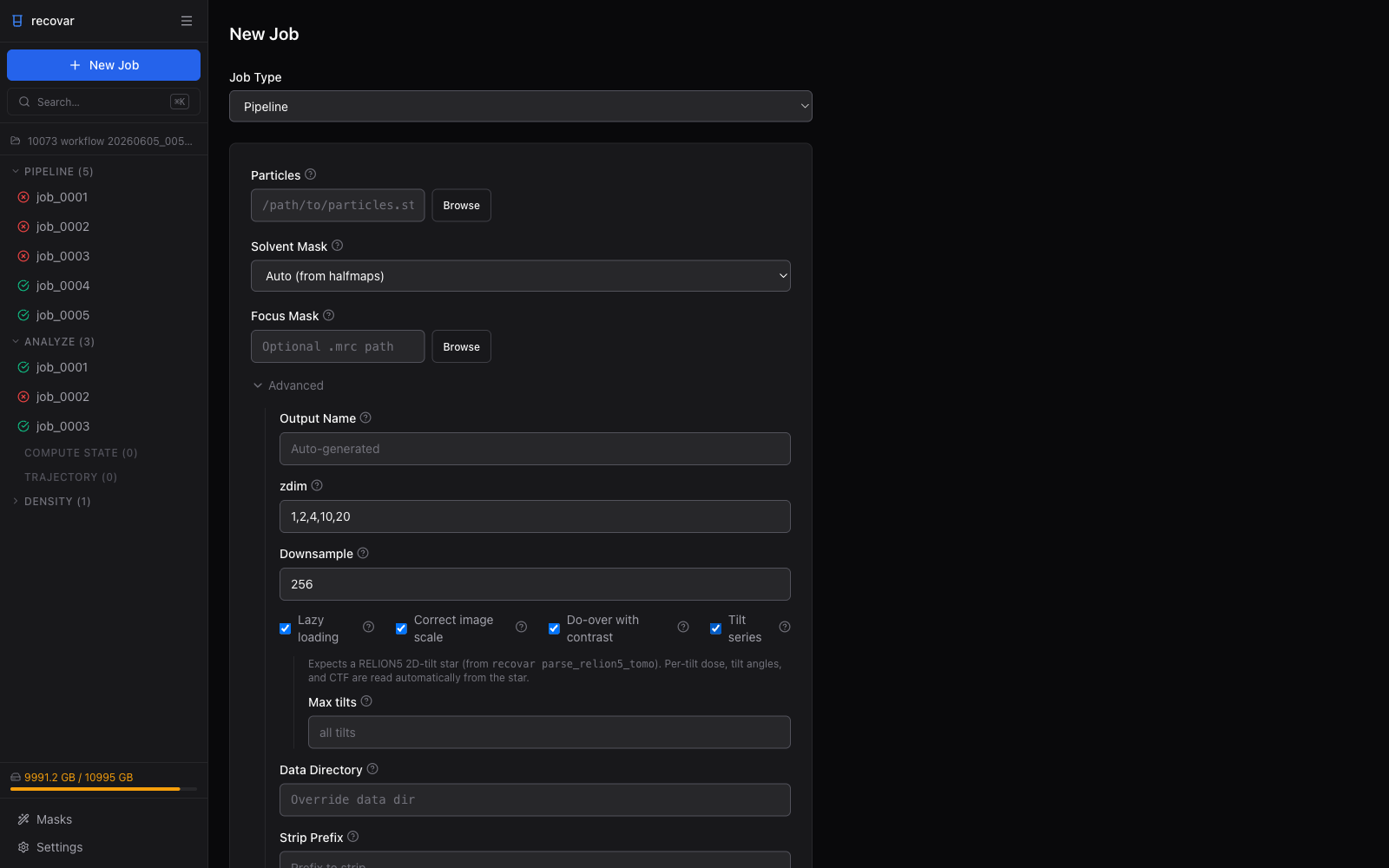
The rest of this page covers the same workflow from the command line.
Importing from RELION5
RECOVAR works on a 2D-tilt star (one row per particle per tilt). Starting from the RELION5 outputs — a tomograms.star with the tilt-series geometry and a particles.star with the 3D particle positions/orientations — you can get there two ways.
Let the pipeline convert (recommended for the CLI)
Pass the RELION5 particles.star as the input and point --tomograms at the geometry star. The pipeline runs the conversion internally before processing, and --tomograms implies --tilt-series:
recovar pipeline Extract/job260/particles.star -o output --mask mask.mrc \
    --tomograms Polish/job249/tomograms.star
Convert explicitly with parse_relion5_tomo
To materialize the 2D-tilt star yourself — for example to load it in the GUI, which takes the 2D star directly — run the conversion as its own step:
recovar parse_relion5_tomo \
    -t Polish/job249/tomograms.star \
    -p Extract/job260/particles.star \
    -o particles_2d.star
This reads the RELION5 3D tomography metadata and produces a 2D STAR file where each row is one tilt of one particle, with per-tilt defocus, orientation, and dose information. The output is directly compatible with recovar pipeline --tilt-series.
Requirements:
tomograms.starfrom a Polish or Tomograms job (contains tilt-series geometry)particles.starfrom an Extract or Refine job (contains 3D particle positions and orientations)
Tilt image dimensions are auto-detected from the MRC headers.
Credits
Projection geometry adapted from relion2cryodrgn by Ryan Feathers (Princeton/Zhong lab), based on code by Bogdan Toader (MRC-LMB/RELION team).
Usage
The input is a 2D STAR file with tilt-series metadata (one row per particle per tilt, grouped by _rlnGroupName).
Options
| Flag | Default | Description |
|---|---|---|
--tilt-series |
False | Enable tilt-series mode |
--tilt-series-ctf |
Auto | CTF model: cryoem, relion5, warp |
--dose-per-tilt |
From file | Dose per tilt in e/A^2 |
--angle-per-tilt |
From file | Tilt angle increment |
--ntilts |
All | Maximum number of tilts to use |
CTF models
| Model | Description |
|---|---|
cryoem |
Standard cryo-EM CTF (for subtomogram averaging) |
relion5 |
RELION 5 tilt-series CTF with dose weighting |
warp |
Warp-style CTF |
The default is relion5 for tilt-series data and cryoem otherwise. The default is correct for RELION5 input, so the GUI does not expose it. warp is experimental.
With focus mask
Add a focus mask with --focus-mask:
recovar pipeline particles.star -o output \
    --mask mask.mrc --focus-mask binding_site.mrc --tilt-series
Tips
- For cryo-ET data, the
--maskrad-fractiondefault (20) may need adjustment. Lower-resolution data may benefit from increasing this value. - The
--n-min-particlesdefault (100) may need to be reduced for smaller tomography datasets. - Use
--ntiltsto limit the number of tilts if some have poor quality.