Extracting Image Subsets
RECOVAR can identify which images contributed to a particular feature in a generated volume — for example, to pull out the particles behind one conformational state and re-import them into RELION or cryoSPARC for focused refinement.
Based on volume features
The extract_image_subset command identifies images that produced a particular region of a volume.
recovar extract_image_subset \
    output/analysis_10/kmeans \
    --output subset_indices.pkl \
    --mask feature_mask.mrc
Specifying the region of interest
Choose one of:
| Method | Flag | Description |
|---|---|---|
| Mask file | --mask mask.mrc |
Center of mass of mask defines the region |
| Coordinates | --coordinate 50,50,50 |
Pixel coordinates of the feature |
| Subvolume index | --subvol-idx 3 |
Direct subvolume index |
Note
The mask's center of mass is used to identify the region. Non-convex masks may give unexpected results — use a simple spherical or box mask around the feature of interest.
Input directory
The first positional argument should be a volume directory generated by analyze, compute_state, or compute_trajectory. For example:
Based on k-means clusters
Extract particles belonging to specific k-means clusters:
# Keep particles in clusters 0 and 3
recovar extract_image_subset_from_kmeans \
    output/analysis_10/data/kmeans_result.pkl \
    subset_indices \
    0,3

# Keep everything EXCEPT clusters 0 and 3
recovar extract_image_subset_from_kmeans \
    output/analysis_10/data/kmeans_result.pkl \
    subset_indices \
    0,3 -i
The output is written to subset_indices/indices.pkl.
Arguments
| Argument | Description |
|---|---|
path_to_centers |
Path to kmeans_result.pkl from analyze (in data/) |
output_path |
Output directory (indices saved as indices.pkl inside) |
kmeans_indices |
Comma-separated cluster indices to keep |
-i, --inverse |
Invert selection (exclude specified clusters) |
Using extracted subsets
The output is a .pkl file containing particle indices. To create a filtered STAR file:
import pickle, starfile

with open("subset_indices.pkl", "rb") as f:
    indices = pickle.load(f)

data = starfile.read("particles.star")
data["particles"] = data["particles"].iloc[indices]
starfile.write(data, "particles_subset.star")
You can then import particles_subset.star back into RELION or cryoSPARC for focused refinement.
Using the GUI
In the web GUI's Latent Space Explorer (available after running Analyze), you can pick particles interactively with the lasso, rectangle, or polygon tools -- no command line needed.
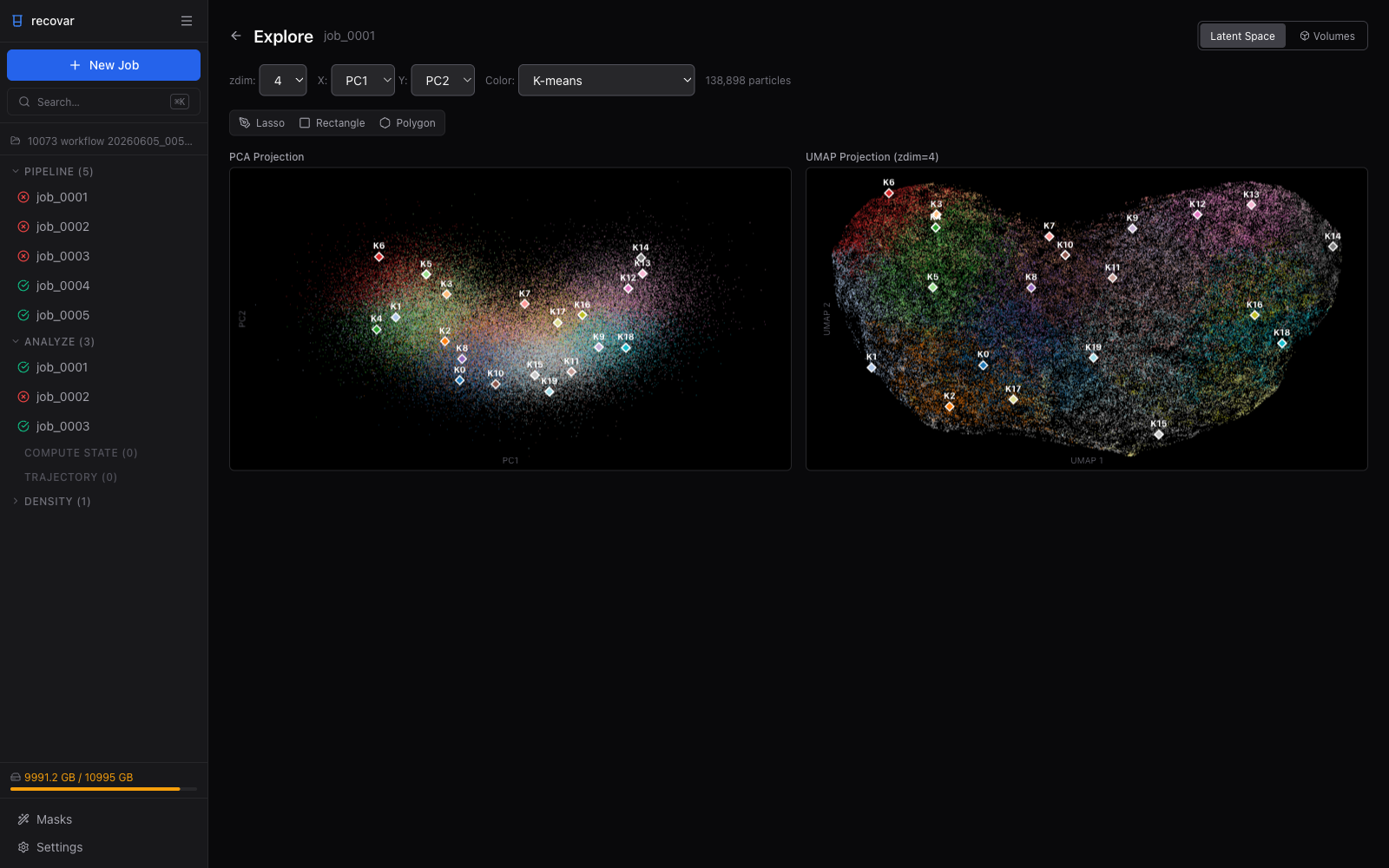
- Open a completed pipeline or analyze job and click Explore Latent Space
- Use the selection tools to draw a region on the PCA or UMAP scatter plot
- The number of selected particles is displayed immediately
- Click Export .star to save the selected particles as a RELION-compatible
.starfile (if the source job has no.starto copy from, the GUI exports a.indindex file instead) - A link to rerun pipeline with the exported subset appears for one-click re-processing
See the GUI Guide for details.